
API Tokens
The API Tokens page lets you create tokens that allow scripts, CI pipelines, mobile apps, and other tools to access your panel account over the API. Each token has its own set of permissions.
Open API Tokens in the panel menu to manage your tokens.
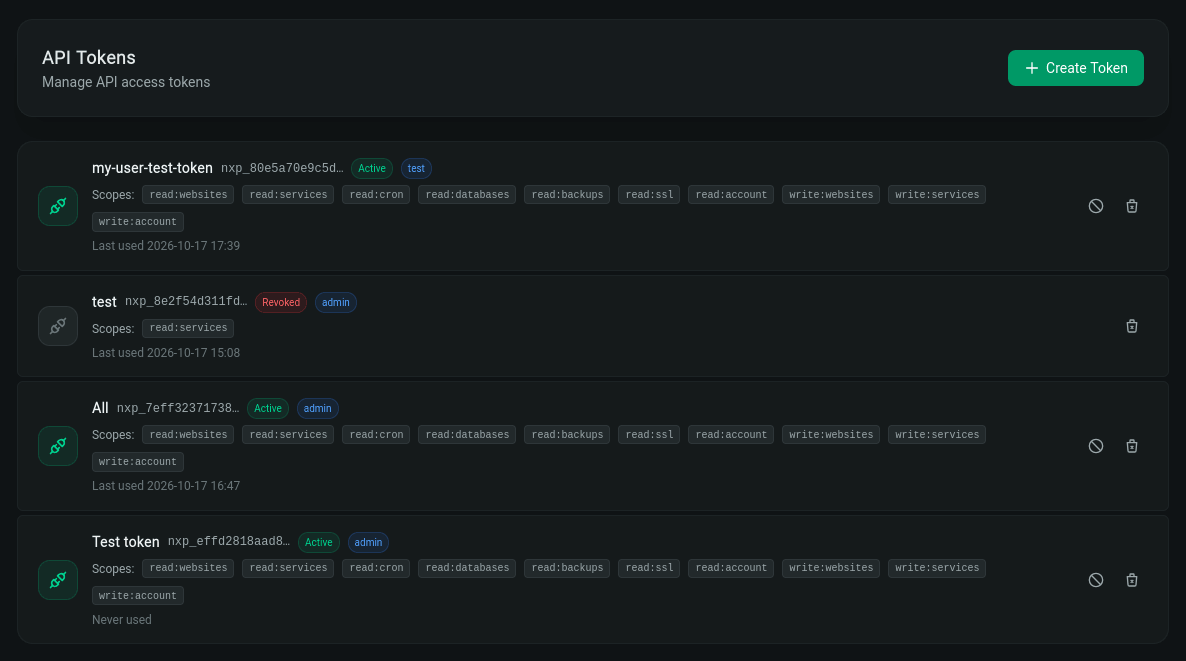
Token List
Every token you have created appears in the list with:
- Name - the label you gave the token
- Prefix - the first 16 characters of the token, for identification
- Status badge -
ActiveorRevoked - User badge -
admin,test, or the user who owns the token (visible to admins only) - Scopes - every permission the token carries, shown as pills
- Last used - when the token was last used to make an API request, or
Never used
Each row has action icons on the right:
- Revoke - disable the token without removing it
- Delete - remove the token entirely
Creating a Token
Click Create Token at the top of the page.
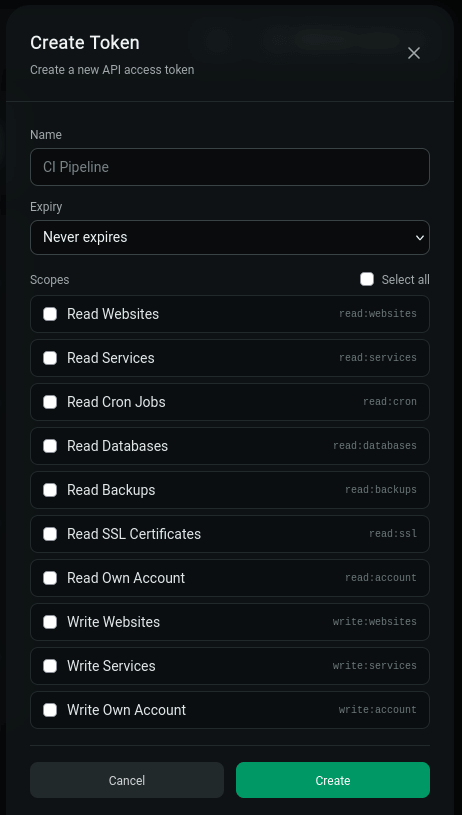
Name
A label to identify the token. Use something descriptive so you know what it is for later, for example CI Pipeline or Backup script on nas01.
The name is only for you. It has no effect on the token's behavior.
Expiry
How long the token stays valid before it is automatically invalidated.
Options:
- Never expires - the token works until revoked or deleted
- 30 days - auto-expires after 30 days
- 90 days - auto-expires after 90 days
- 365 days - auto-expires after one year
Use short expiries for tokens used in temporary contexts. Use long expiries only for tokens you will rotate on a schedule, or that live on a trusted machine with file permissions protecting the credential.
Scopes
The permissions this token has. Each scope grants access to a specific set of endpoints.
Note
Which scopes appear in the Create Token drawer depends on your account role. Admin accounts see every scope listed below. Regular user accounts see only the scopes that apply to what they can access.
Currently available scopes (admin accounts):
Currently available scopes (admin accounts):
| Scope | What it allows |
|---|---|
read:websites |
List and view websites |
write:websites |
Toggle website active status |
read:services |
List and view system services |
write:services |
Start, stop, restart, reload services |
read:cron |
List and view cron jobs |
write:cron |
Create, update, and delete cron jobs |
read:dns |
List and view DNS zones and records |
read:databases |
List and view databases |
read:backups |
List and view backups |
read:ssl |
List and view SSL certificates |
read:audit |
Query the audit log |
read:server |
View server hardware and resource stats |
read:account |
View your own account |
write:account |
Change your own password |
read:system |
View OS update state and job status |
write:system |
Refresh package lists, start updates, and schedule reboots |
The Select all checkbox next to the scopes heading toggles every scope you have access to on or off.
Tip
Grant only the scopes the token actually needs. A token that reads websites does not need write:services. If the token leaks, the blast radius is limited to what it can do.
Token Shown Once
After clicking Create, the token is displayed once in a modal window. It looks like:
nxp_a1b2c3d4e5f6a7b8c9d0e1f2a3b4c5d6e7f8a9b0c1d2e3f4a5b6c7d8
Copy it before closing the modal. The panel stores only a SHA-256 hash of the token and its display prefix. It cannot be shown again.
If you lose the token, delete it and create a new one. There is no way to recover the original value.
Revoke vs Delete
Two ways to disable a token. They are different.
Revoke
Click the crossed-circle icon on any active token. The token is marked Revoked but stays in the list.
Revoked tokens:
- Stop authenticating immediately. Any request using them returns
401 Unauthorized. - Remain visible in the list with their last-used timestamp
- Stay in audit logs so you can trace what they did
- Cannot be reactivated. To get a working token back, create a new one.
Use revoke when you want to disable a token but keep a record of it. This is the safer option because the audit trail stays intact.
Delete
Click the trash icon to remove the token entirely.
Deleted tokens:
- Stop authenticating immediately
- Disappear from the API Tokens list
- Cannot be restored
- Any audit log entries the token created stay in the Audit Logs page, but the token itself is gone
Use delete when you are certain you do not need the token's history. For example, cleaning up old tokens after a project ends.
Revoked Tokens
Revoked tokens stay in the list with the Revoked badge. They cannot be used, but they provide a record of what existed.
From a revoked token's row:
- Delete is the only action available
- Last used shows when it was last successfully used before being revoked, which is useful for tracing
Tracking Usage
The Last used timestamp on each token shows when the token last authenticated successfully. If a token shows Never used after days or weeks, it may be misconfigured or unused, and worth deleting.
The Audit Logs page shows the actor format for API calls as api:<username>@<prefix>. For example:
api:admin@nxp_a1b2c3d4e5f6
You can search the audit log by prefix to see everything a specific token did.
Note
Audit logs are visible to admin accounts only. Regular user accounts cannot access the Audit Logs page, so API activity for their tokens is only visible to admins.
Security Notes
- Treat tokens like passwords. Anyone with the token can authenticate as you for whatever scopes it carries.
- Store tokens securely. Environment variables, secret managers, or config files with restricted permissions. Not in source code, not in shell history, not in shared documents.
- Rotate tokens periodically. Delete and recreate tokens on a schedule, especially for long-lived integrations.
- Revoke tokens you no longer use. Old tokens on forgotten machines are a common attack vector.
- Watch for
api:entries in the audit log. If you see activity from a prefix you do not recognize, revoke it immediately.
Warning
If a token may have leaked, revoke it immediately. Do not wait to investigate. Revoking is instant and reversible only by creating a new token, which is what you would do anyway after a leak.
Related
- API Usage - what the API is and how to use it
- Authentication - how token auth works on the server side
- API Settings - admin controls for the API (enable, rate limit, audit)