
Panel Users
Panel users are accounts that can log in to the NexPanel interface. They are separate from system users, which are OS-level accounts used to host websites and files on your server.
To manage panel users, log in as an admin and open Users in the main menu.
Roles
Every panel user has one of two roles.
Admin
Admins have full access to the panel, including:
- Managing other panel users
- Changing panel settings
- Viewing all websites, databases, and system resources
- Managing licenses, updates, and security
User
Regular users have access to limited features and cannot:
- Manage other panel users
- Change panel-wide settings
- Access admin-only sections
Use this role for team members who only need to manage websites or specific features without touching system configuration.
Creating a User
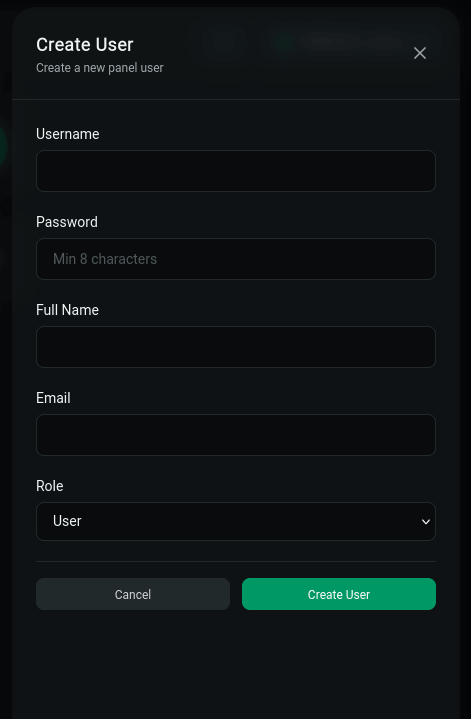
To add a new panel user:
- Open the Users page
- Click Create User in the top right
- Fill in the fullanme, username, password, email, and choose a role
- Save
The new user can log in immediately with the credentials you set. Share them securely and ask the user to change the password after the first login.
Tip
Give each person their own panel user. Sharing accounts makes it impossible to audit who did what.
User List
The Users page lists all panel users with their username, role, and status.
Disabling 2FA
If a user loses access to their authenticator app or recovery codes, an admin can disable two-factor authentication for that user from the Users page.
- Find the user in the list
- Open their actions menu
- Click Disable 2FA icon
The user can then log in with just their password and re-enroll in 2FA.
Warning
Only disable 2FA when you have verified the user's identity through another channel. Disabling 2FA removes a critical security layer from their account.
Deleting a User
Admins can delete a panel user from the Users page. Deleting a user:
- Removes their panel access immediately
- Does not delete any websites, databases, or files they created
- Does not affect the system user they were associated with
If you only need to temporarily block access, consider changing their password instead of deleting the account.
Warning
You cannot delete your own admin account. Make sure at least one other admin exists before removing admin access from a user.