
Audit Logs
The Audit Logs page records user actions taken in the panel. Every change to settings, users, websites, licenses, and other resources is written here, with who did it and when.
Audit logs are visible to admins only. Regular panel users cannot access this page.
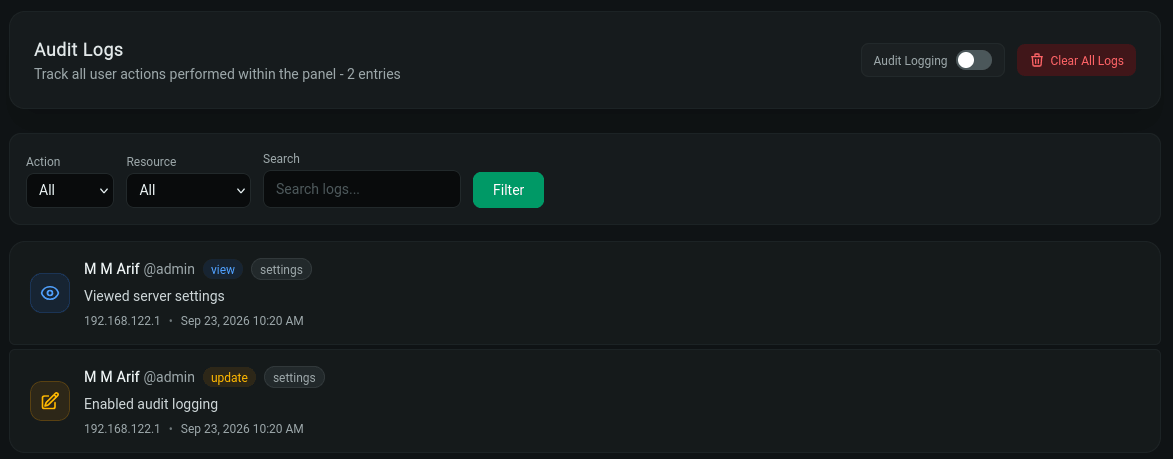
Enabling Audit Logging
Audit logging is controlled by the toggle in the top-right corner.
When off, no new entries are recorded. Existing entries stay in the log until you clear them. When on, every tracked action is written as it happens.
Turn this on if you need:
- A record of who changed what, for compliance or troubleshooting
- Visibility into users activity on shared installations
- A way to investigate unusual behavior after the fact
Turn it off if disk space or performance is a concern and you do not need the records.
Filters
Three filters at the top narrow down what is shown.
Action
Filter by the type of action. Options include:
- All - every action
- View - resources viewed
- Create - resources created
- Update - resources changed
- Delete - resources removed
The exact list depends on which actions the panel tracks.
Resource
Filter by the type of resource the action was performed on. Examples:
- All
- Website
- Database
- User
- Backup
- Setting
- and so on...
This lets you see everything that happened to a specific resource type, for example "show me every website creation in the last week."
Search
Free-text search across log entries. Matches against:
- Username
- Resource name
- Action description
- Any other text stored in the entry
Use this for specific queries like a username, a website name, or an IP address.
Click Filter to apply all filters at once. Combined filters narrow the result further.
Log Entries
Each entry shows:
- Timestamp - when the action occurred
- User - which panel user performed it
- Action - what was done
- Resource - what was affected
- Details - additional context such as IP address
Entries are shown newest first.
Clearing the Log
Click Clear All Logs in the top-right corner to delete every audit log entry.
Warning
Audit logs are often the only record of who changed what. Do not clear them unless you are sure you do not need the history.
Notes
- Audit logs cover panel actions only. Changes made directly on the server over SSH are not recorded here
- Website actions, database creation, user management, and license changes are all tracked
- Log entries are stored in the panel database. Backing up the panel database preserves them
Tip
If you are investigating an incident, filter by a specific user and set the Action filter to All. This shows everything that user did, in order, which is usually the fastest way to spot the change that caused the problem.