
WAF
The Web Application Firewall (WAF) filters incoming HTTP requests and blocks those that match known attack patterns. NexPanel uses ModSecurity rules under the hood and applies them per website.
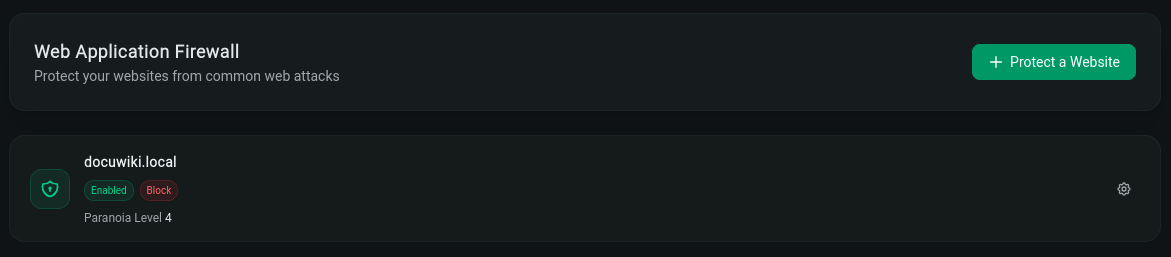
Protected Websites
The page lists every website with WAF enabled. Each row shows:
- Website domain
- WAF Status -
Enabledwhen protection is active,Disabledwhen the site is listed but rules are off - Mode -
BlockorDetect Only - Paranoia Level - the current OWASP CRS paranoia setting
On the right, a settings icon opens the per-website WAF configuration drawer.
Protecting a Website
Click Protect a Website to open the site picker.
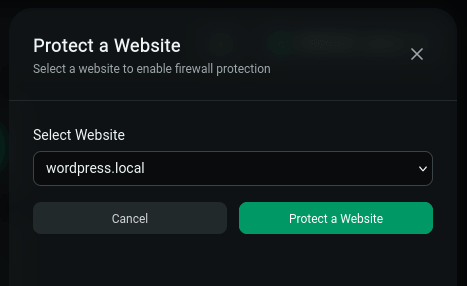
Choose a website from the dropdown and confirm. The panel:
- Installs the WAF rules for the site
- Reloads the web server
- Adds the site to the list with sensible defaults
The site is protected immediately. You can fine-tune settings per site afterward.
WAF Settings
Click the settings icon on any protected site to open its configuration.
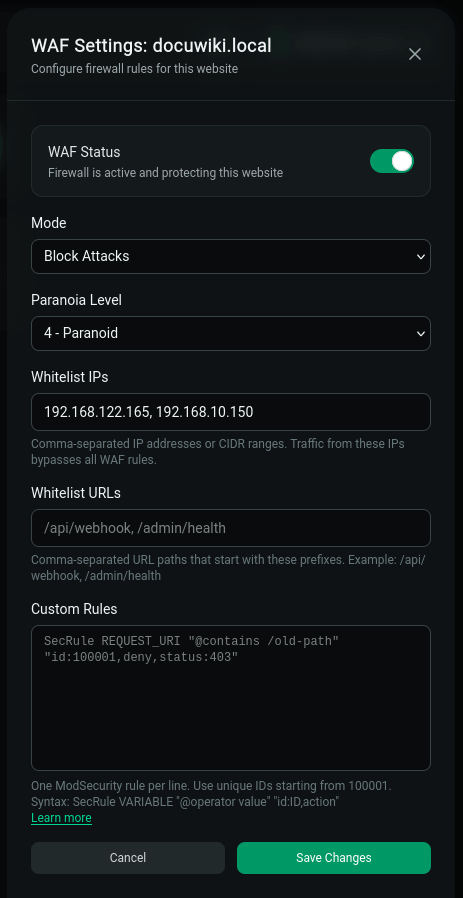
WAF Status
Master on/off switch for this website. When off, no rules are evaluated and the site behaves as if WAF was never installed.
Turning it off is useful for debugging: if a problem goes away with WAF off, you know a rule is the cause.
Mode
Two options:
- Block Attacks - matching requests are rejected with a
403 Forbiddenresponse - Detect Only - matching requests are logged but allowed through
Use Detect Only when first enabling WAF on a live site. It records what would be blocked without breaking anything. Review the logs for a few days, adjust whitelists, then switch to Block.
Paranoia Level
Controls how aggressive the rule set is. Higher levels block more, but also risk more false positives.
- Level 1 - basic protection, minimal false positives
- Level 2 - more rules, still safe for most sites
- Level 3 - aggressive, may block legitimate traffic
- Level 4 - maximum protection, expects careful whitelisting
Most sites are fine at Level 2. Go higher only if you need extra protection and are prepared to tune.
Whitelist IPs
A comma-separated list of IPs or CIDR ranges that bypass the firewall entirely.
Examples:
192.168.1.1- a single IP10.0.0.0/8- a private network range203.0.113.5, 198.51.100.0/24- multiple entries
Use this for:
- Your own office or home IP so admin tools work
- Uptime monitoring services
- Trusted API clients
Whitelist URLs
A comma-separated list of URL paths that skip WAF rules. Any request starting with these prefixes is allowed.
Examples:
/api/webhook- external service callbacks/admin/health- internal health checks/stripe/webhook- payment provider callbacks
Webhooks often send payloads that look like attacks to generic rules. Whitelisting their paths prevents false positives.
Custom Rules
Write raw ModSecurity rules for cases the built-in rules do not cover.
Each line is a rule. Rules must use unique IDs starting at 100001 to avoid conflicting with the built-in OWASP CRS ruleset.
Syntax follows the standard ModSecurity SecRule format:
SecRule VARIABLE "@operator value" "id:ID,action"
Example - block requests to a specific path:
SecRule REQUEST_URI "@contains /old-path" "id:100001,deny,status:403"
Warning
Custom rules run alongside the OWASP CRS ruleset. Bad syntax can prevent the web server from starting. Test carefully on a staging site before applying to production.
Notes
- WAF requires an active license
- WAF rules apply per website. Enabling WAF on one site does not affect others
- Rule updates come with panel updates. You do not manage rule sets manually
- WAF protects against common attacks (SQL injection, XSS, path traversal, and similar). It is not a substitute for secure application code